Translations
Nextcloud provides mechanisms for internationalization (make an application translatable) and localization (add translations for specific languages). This section provides detailed instructions for both aspects. In order to make your app translatable (internationalization), you should use Nextcloud’s methods for translating strings. They are available for both the server-side (PHP, Templates) as well as for the client-side (JavaScript).
PHP Backend
If localized strings are used in the backend code, simply inject the \OCP\IL10N class into your service via type hinting it in the constructor. You will automatically get the language object containing the translations of your app:
<?php
class AuthorService {
    public function __construct(
        private \OCP\IL10N $l,
    ) {
    }

    …
}
Strings can then be translated in the following way:
<?php
class AuthorService {

    …

    public function getLanguageCode() {
        // Get the language code of the current language
        return $this->l->getLanguageCode();
    }

    public sayHello() {
        // Simple string
        return $this->l->t('Hello');
    }

    public function getAuthorName($name) {
        // String using a parameter
        return $this->l->t('Getting author %1$s', [$name]);
    }

    public function getAuthors($count, $city) {
        // Translation with plural
        return $this->l->n(
            '%n author is currently in the city %1$s', // singular string
            '%n authors are currently in the city %1$s', // plural string
            $count, // number to decide which plural to use
            [$city] // further parameters are possible
        );
    }
}
Language of other users
If you need to get the language of another user, e.g. to send them an email or inside a background job, there are also
the force_language and default_language configuration options to consider. To make this easier, the
OCP\L10N\IFactory class comes with a getUserLanguage method:
<?php
class SendEmail {
    public function __construct(
        private \OCP\L10N\IFactory $l10nFactory,
     ) {
    }

    public function send(IUser $user): void {
        $lang = $this->l10nFactory->getUserLanguage($user);
        $l = $this->l10nFactory->get('myapp', $lang);

        // …
    }
PHP Templates
In every template the global variable $l can be used to translate the strings using its methods t() and n():
// Simple text string
<button><?php p($l->t('Hide')); ?></button>

// Text with a placeholder
<div><?php p($l->t('Show files of %1$s', [$user])); ?></div>

// Date string
<em><?php p($l->l('date', time())); ?></em>
JavaScript / TypeScript / Vue
There are global functions t() and n() available for translating strings in javascript code.
If your app is build, you can import the translation functions from the @nextcloud/l10n package.
They differ a bit in terms of usage compared to php:
First argument is the appId e.g.
'myapp'Placeholders (apart from the count in plurals) use single-mustache brackets with meaning-full descriptors.
The parameter list is an object with the descriptors as key.
t('myapp', 'Hello World!');
t('myapp', '{name} is available. Get {linkstart}more information{linkend}', {name: 'Nextcloud 16', linkstart: '<a href="...">', linkend: '</a>'});
n('myapp', 'Import %n calendar into {collection}', 'Import %n calendars into {collection}', selectionLength, {collection: 'Nextcloud'});
ExApps (Python)
For ExApps, Python is currently only supported for automated Transifex translations.
Alongside the usual l10n/*.json and l10n/*.js files, translation source files located in translationfiles/<lang>/*.po are also included in the Transifex sync.
These .po files can be compiled into .mo files, which are typically used by the ExApp backend for runtime translations.
For more details, see Translations.
Guidelines
Please also look through the following hints to improve your strings and make them better translatable by the community and therefore improving the experience for non-english users.
Dos and Don’ts
Bad |
Good |
Description |
|---|---|---|
|
|
Use ascii single quote |
|
|
Use Unicode triple-dot character.
Add a non-breaking space before the triple-dot when trimming a sentence instead of a word.
|
Loading …(a general space
U+0020) |
Loading …(a non-breaking space
U+00A0) |
Only use a non-breaking space before the triple-dot (
U+00A0). |
Don’t |
Do not |
Using the spelled out version is easier to understand and makes translating easier. |
Won’t |
Will not |
Using the spelled out version is easier to understand and makes translating easier. |
Can not |
Cannot |
Using the combined version is easier to understand and makes translating easier. |
id |
ID |
Full uppercase for shortcutting “identifier” |
Users |
Accounts / People |
Use accounts when you refer to a profile/entity. Use people when referring to humans. |
Admin / Administrator |
Administration |
Refer to administration as a non-human organizational entity
instead of a single or multiple persons.
|
Headline |
Headline: |
Include colons |
“ Leading space”
“Trailing space “
|
“No leading space”
“No trailing space”
|
Leading or trailing spaces mostly indicate that strings are concatenated.
For translators it is often helpful to have all the content in a single translation,
as order and references between words and sentences might get lost otherwise.
|
“Error:” $error |
“Error: %s” |
Instead of concatenating errors or part messages, make them a proper placeholder |
Correct plurals
If you use a plural, you must also use the %n placeholder. The placeholder defines the plural and the word without the number preceding is wrong. If you don’t know/have a number for your translation, e.g. because you don’t know how many items are going to be selected, just use an undefined plural. They exist in every language and have one form. They do not follow the normal plural pattern.
PHP Example:
// BAD: Plural without count
$title = $l->n('Import calendar', 'Import calendars', $selectionLength)
// BETTER: Plural has count, but disrupting to read and unnecessary information
$title = $l->n('Import %n calendar', 'Import %n calendars', $selectionLength)
// BEST: Simple string with undefined plural not using any number in the string
$title = $l->t('Import calendars')
Opposed to the normal placeholders in javascript, the plural number also uses the %n syntax:
JS Example:
/* BAD: Plural without count */
n('myapp', 'Import calendar', 'Import calendars', selected.length)
/* BETTER: Plural has count, but disrupting to read and unnecessary information */
n('myapp', 'Import %n calendar', 'Import %n calendars', selected.length)
/* BEST: Simple string with undefined plural not using any number in the string */
t('myapp', 'Import calendars')
Important
General rule: Whenever a variable with varying values (numbers) is part of a string, the plural form must be used.
There are languages with multi-plural forms. See https://en.wikipedia.org/wiki/Plural#Use_in_systems_of_grammatical_number
Example
"Vault will be locked in %1$d seconds"
This means that even though the value ‘seconds’ is always greater than 1, translators on Transifex are unable to produce valid translations in the plural form for some languages.
Bad: Only one string provided
"Vault will be locked in %1$d seconds"
Good: Two strings in source code.
"Vault will be locked in %1$d second"
"Vault will be locked in %1$d seconds"
Improving your translations
Starting with the following example, improving it step by step:
<?php p($l->t('Select file from')) . ' '; ?><a href='#' id="browselink"><?php p($l->t('local filesystem'));?></a><?php p($l->t(' or ')); ?><a href='#' id="cloudlink"><?php p($l->t('cloud'));?></a>
Step 1: String split
You shall never split sentences and never concatenate two translations (e.g. “Enable” and “dark mode” can not be combined to “Enable dark mode”, because languages might have to use different cases)! Translators lose the context and they have no chance to possibly re-arrange words/parts as needed.
Translators will translate:
Select file fromlocal filesystemor(with leading and trailing whitespace)cloud
Translating these individual strings results in local filesystem and cloud losing case. The two white spaces surrounding or will get lost while translating as well. For languages that have a different grammatical order it prevents the translators from reordering the sentence components.
So the following code is a bit better, but suffers from another issue:
<?php p($l->t('Select file from <a href="#" id="browselink">local filesystem</a> or <a href="#" id="cloudlink">cloud</a>'));?>
Step 2: HTML Markup
In this case the translators can re-arrange as they like, but have to deal with your markup and can mess it up easily. It is better to keep the markup out of your code, so the following translation is even better:
<?php p($l->t('Select file from %slocal filesystem%s or %scloud%s', ['<a href="#" id="browselink">', '</a>', '<a href="#" id="cloudlink">', '</a>']));?>
But there is one last problem with this.
Step 3: Placeholders
In case the language has to turn things around, your code will still insert the parameters in the given order and they can not re-order them. To prevent this last hurdle simply use positioned placeholders like %1$s:
<?php p($l->t('Select file from %1$slocal filesystem%2$s or %3$scloud%4$s', ['<a href="#" id="browselink">', '</a>', '<a href="#" id="cloudlink">', '</a>']));?>
This allows translators to have the cloudlink before the browselink in case the language is e.g. right-to-left.
Provide context hints for translators
Some translation strings can be translated wrongly because they have multiple meanings.
Strings that contain only a single word are especially prone to this.
The most famous example in the Nextcloud code base is Share, which can be the verb and action
To share something or the noun A share.
Adding a context hint resolves the ambiguity, and the hint is shown to translators in the Transifex web interface.
Warning
A // TRANSLATORS comment is only associated with the first translation string on the following line.
If a single line of code contains two or more translation strings, the comment applies to the first one only,
and the remaining strings will have no context hint. Refactor the code so that each line holds a single
translation call, placing its own // TRANSLATORS comment on the line above.
// BAD: only "Save" gets the context hint, "Cancel" has none
// TRANSLATORS Confirm or discard the current changes
return [$l->t('Save'), $l->t('Cancel')];

// GOOD: one translation per line, each with its own hint
// TRANSLATORS Confirm the current changes
$save = $l->t('Save');
// TRANSLATORS Discard the current changes
$cancel = $l->t('Cancel');
return [$save, $cancel];
PHP
Place the comment on the line before the ->t() or ->n() call:
// TRANSLATORS Will be shown inside a popup and asks the user to add a new file
p($l->t('Add new file'));

// TRANSLATORS The placeholder refers to the software product name, e.g. "Add to your Nextcloud"
$l->t('Add to your %s', [$productName]);
For multi-line context or example output, use consecutive comment lines:
// TRANSLATORS
// Indicates when a calendar event will happen, shown on invitation emails.
// Output example: "In 1 hour on July 1, 2024 for the entire day"
$l->t('In %1$s on %2$s for the entire day', [$relativeTime, $date]);
JavaScript / TypeScript
Place the comment on the line before the t() or n() call:
// TRANSLATORS: name that is appended to copied files, will be put in parenthesis with a number for the second+ copy
var copyNameLocalized = t('files', 'copy');

// TRANSLATORS: {relativeDueDate} will be replaced with a relative time, e.g. "2 hours ago" or "in 3 days"
t('files_reminders', 'We will remind you of this file {relativeDueDate}', { relativeDueDate })
Vue
In the <template> block, use an HTML comment on the line above the element:
<!-- TRANSLATORS: Making this question necessary to be answered when submitting to a form -->
<span>{{ t('forms', 'Required') }}</span>
In the <script> block, use the same // style as JavaScript.
Note
The marker depends on the extraction toolchain, and the examples below are not all
TRANSLATORS. The gettext-based projects - PHP, JavaScript/TypeScript and Vue - require the
comment to start with TRANSLATORS, because that is the prefix the extractor is configured to
look for. Android uses a plain XML comment and TRANSLATORS there is a project convention
rather than a requirement. Qt and iOS use their own markers - //: for lupdate and a
/* ... */ comment for the iOS string tooling - and writing TRANSLATORS in those files
produces no hint at all, because the extractor never looks for it.
C++ (Qt) / Desktop client
//: Example text: "Progress of sync process. Shows the currently synced filename"
fileProgressString = tr("Syncing %1").arg(allFilenames);
Android
<!-- TRANSLATORS List of deck boards -->
<string name="simple_boards">Boards</string>
iOS
/* The title on the navigation bar of the Scanning screen. */
"wescan.scanning.title"             = "Scanning";
Contributing a context hint without a local checkout
Context hints are one of the few code changes that are worth making even if you do not develop Nextcloud. Translators are usually the people who notice that a string is ambiguous, and a hint is a single comment line. You do not need git, a development environment or a checkout to add one - the GitHub web editor is enough.
Find the string
Search the repository the string belongs to for the text in quotes. If you do not know which
repository that is, the Transifex resource name matches the app: a string in the files_external
resource lives in apps/files_external/ in nextcloud/server, and a string in the deck
resource lives in nextcloud/deck.
Edit the file
Open the file on GitHub and click the pencil icon.
Unless you are a member of the Nextcloud organisation, you will not land in the editor. GitHub stops you with “You need to fork this repository to propose changes” and a Fork this repository button. Nothing has gone wrong. A fork is your own copy of the repository under your own account: you make the change there, and the pull request asks the Nextcloud maintainers to take it from your copy into theirs. Click the button; it takes a moment and then opens the editor.
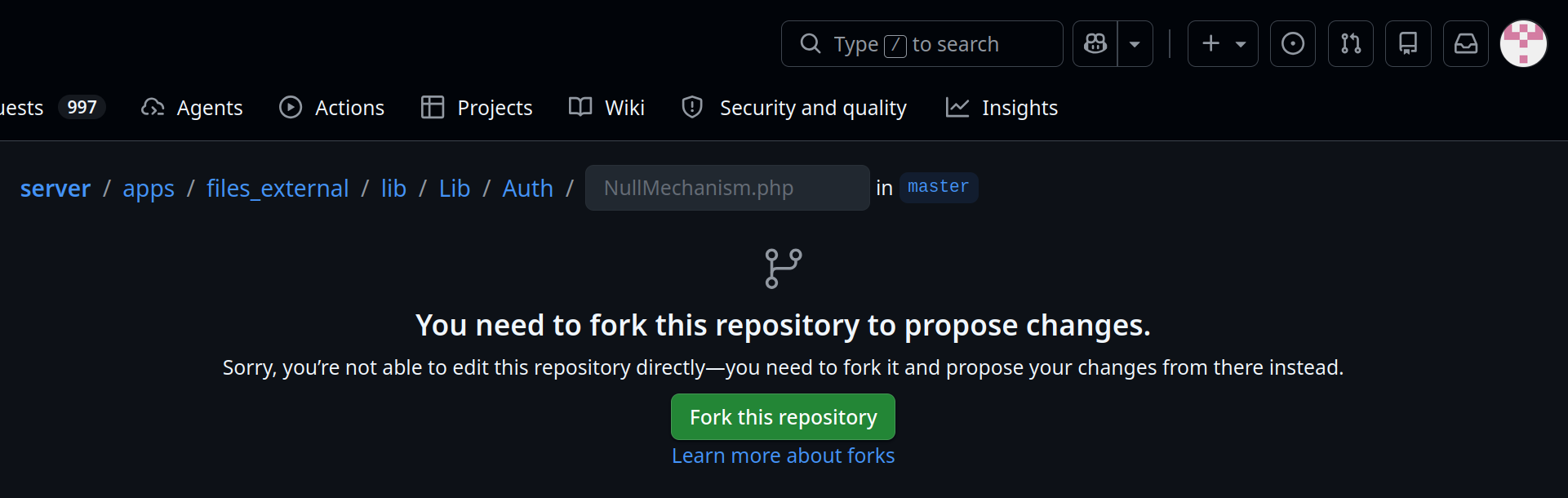
What an outside contributor sees instead of the editor. This is expected.
You only do this once. The fork stays on your account, so the next hint you add starts in the editor straight away.
If it has been a while since you last contributed, your fork will be behind the original repository.
Go to your fork - github.com/<your-username>/<repository> - and look at the bar above the file
list. When the fork is out of date, a line there reads “This branch is N commits behind …”, with
a Sync fork button at its right-hand end, next to Contribute. Use it, then Update branch,
before you start editing, so your change is made against the current files rather than an old copy.
If no such line is shown, your fork is already up to date and there is nothing to do.

An out-of-date fork. The Sync fork button only appears while there is something to sync.
Once you are in the editor a banner reads “You’re making changes in a project you don’t have write access to. Submitting a change will write it to a new branch in your fork …, so you can send a pull request.” That is the expected state for an outside contributor.
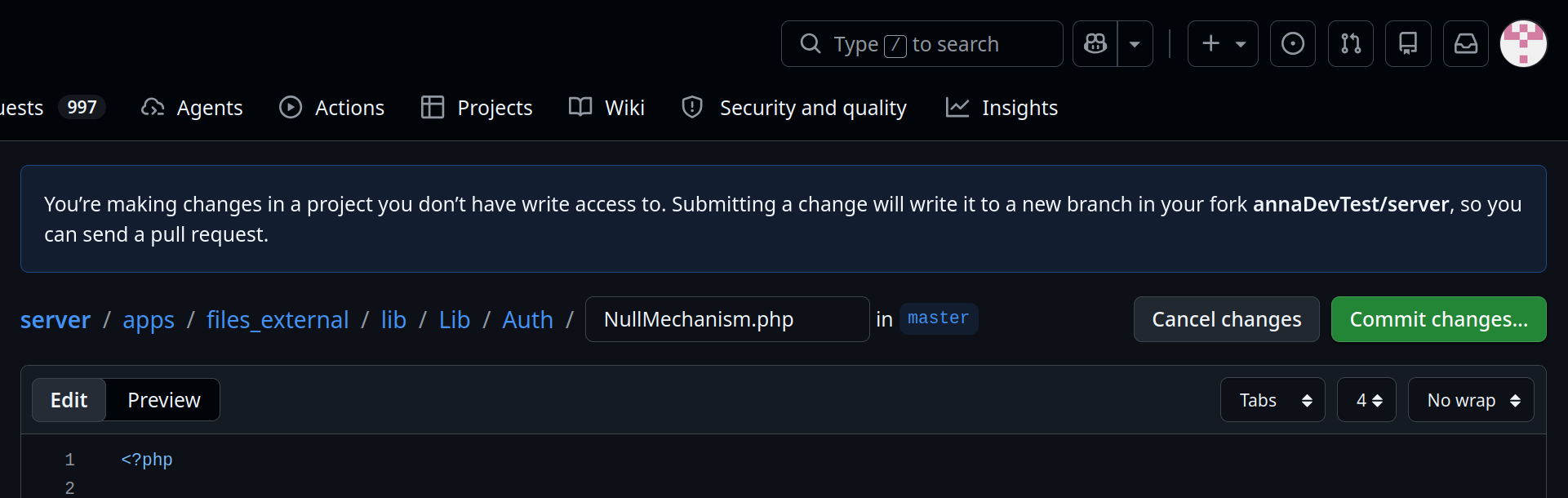
After forking: the banner names your fork, and the editor opens as normal.
Add the comment on the line directly above the translation call, in the style that matches the file type (see the examples above), and match the surrounding indentation exactly. The editor’s Tabs / width / wrap controls, above the top-right of the text area, show what the file uses.
// TRANSLATORS Name of the SMB/CIFS share on the server, not the verb "to share"
'share' => $l->t('Share'),
Commit and open the pull request
Click Commit changes…. A dialog headed Sign off and propose changes opens, with a commit message, an extended description, and a Sign off and propose changes button that takes you to the pull request form. You are not asked to choose a branch: a change to a fork always goes to a new branch, which is what the pull request is opened from.
Nextcloud uses conventional commits, so the message needs a type and a short summary, for example
docs: add translator comment for "None". Check the repository’s recent history for the types it actually uses.Do not accept a pre-filled message without reading it. The dialog may arrive with the message and description already written - if Copilot is enabled for your account it suggests them, and the dialog says so underneath. The suggestion describes the change accurately enough but has no type prefix, for example “Add translator comment in NullMechanism constructor”. Putting
docs:in front of it is normally the whole fix. This is the most likely reason a first pull request fails a check.You do not need to add a
Signed-off-byline by hand. The dialog signs the commit off for you and shows which address it is using, which satisfies the DCO check. If you have enabled Keep my email addresses private in your GitHub settings, that address is your@users.noreply.github.comone.
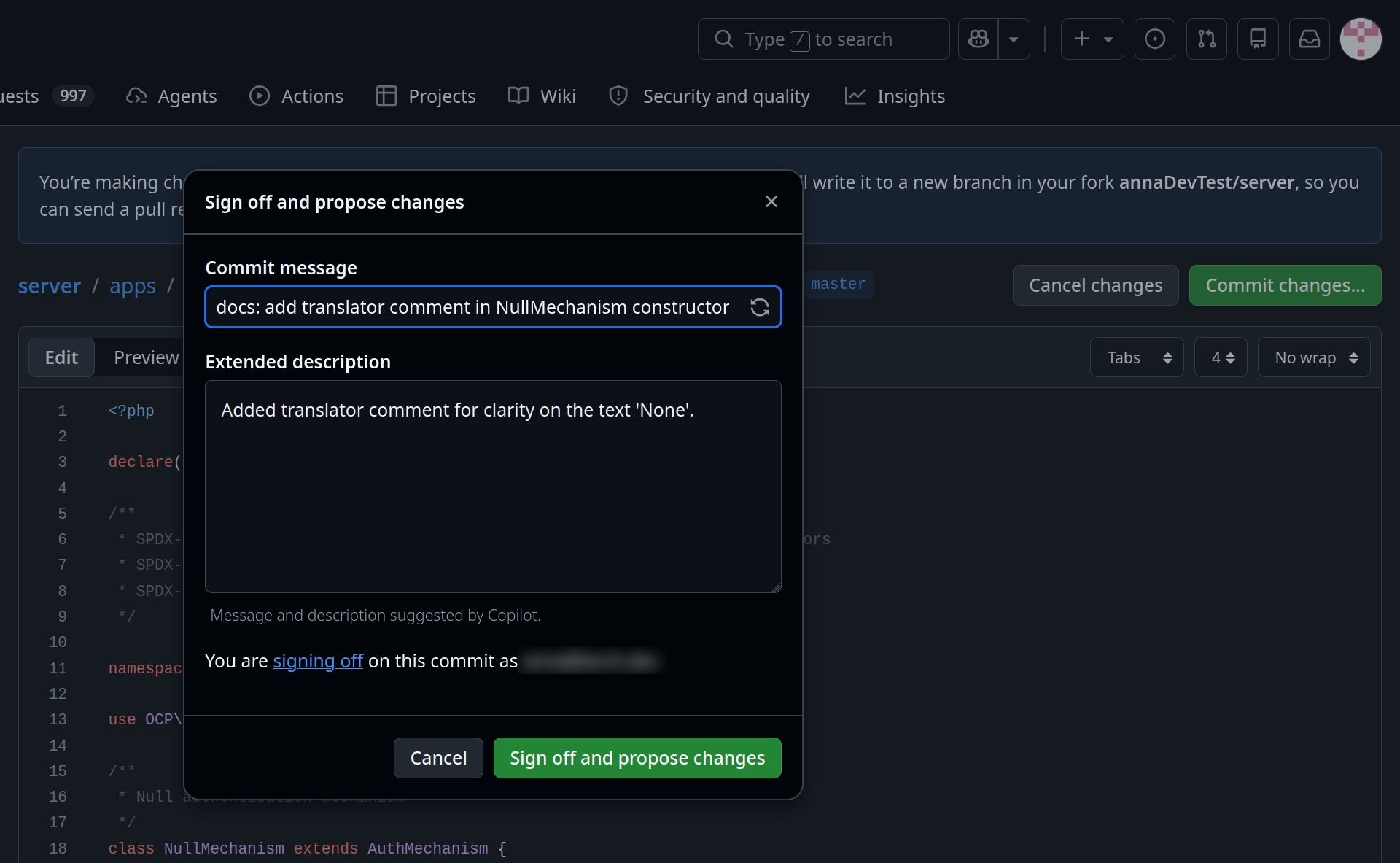
The commit dialog, with the suggested message already corrected to a conventional commit.
Avoiding the automated checks, rather than fixing them
Pull requests run linters and coding-style checks, and there is generally no way to run or fix those from the web interface. It is therefore worth avoiding a failure in the first place:
Put the comment on its own line. Do not append it to an existing line of code.
Copy the indentation of the line below it, including tabs versus spaces.
Leave no trailing whitespace at the end of the comment.
Change nothing else in the file, so that the diff is the single added line.
If a check does fail, say so in the pull request. A maintainer can push the fix to your branch.
What happens next
A Nextcloud maintainer will review the pull request. You do not need to request a review, add labels or assign anyone - an outside contributor cannot do those things, and it is not a sign that anything is missing from your pull request. If nothing happens for a while, a polite comment on the pull request is the right nudge.
You are also welcome to tell the translation community about it. Other translators hit the same ambiguous strings, and it is the easiest way to let them know a hint is on its way:
the translation chat room is open to the public and needs no account, and is the quickest way to say something
the Translations category of the Nextcloud forum keeps the note findable afterwards. Anyone can read it, but posting needs a free forum account
Post the link to your pull request and a sentence about the string you clarified.
Once it is merged, the hint still does not reach translators immediately. It reaches them when the source strings are next extracted and synchronised to Transifex, so allow for that delay before looking for it in the web interface.
Adding translations
The steps how to set up translations for an app have been moved to it’s own page in the “App development” chapter: Translation
Testing translations
You can use the query parameter forceLanguage to force a specific language for a web request (API or frontend). See Forcing language for a given call.
Console commands
l10n:createjs
Generate JavaScript translation files for an app from its l10n/ source
files. Pass the app ID and optionally a specific language code:
sudo -E -u www-data php occ l10n:createjs myapp
sudo -E -u www-data php occ l10n:createjs myapp de
When no language is specified, JavaScript files are generated for all
available languages. The output files are written to the app’s l10n/
directory as <lang>.js and <lang>.json.
Note
This command is intended for development and CI pipelines. In production, JavaScript translation files are generated automatically during app installation and updates.